 RoomTested
 Best single-board computers: 3 picks, and what to build with each
A UK guide to three single-board computers: the all-rounder Raspberry Pi 5, an RK3588 powerhouse like the Orange Pi 5, and the NanoPi R6S firewall box, with what to build on each.
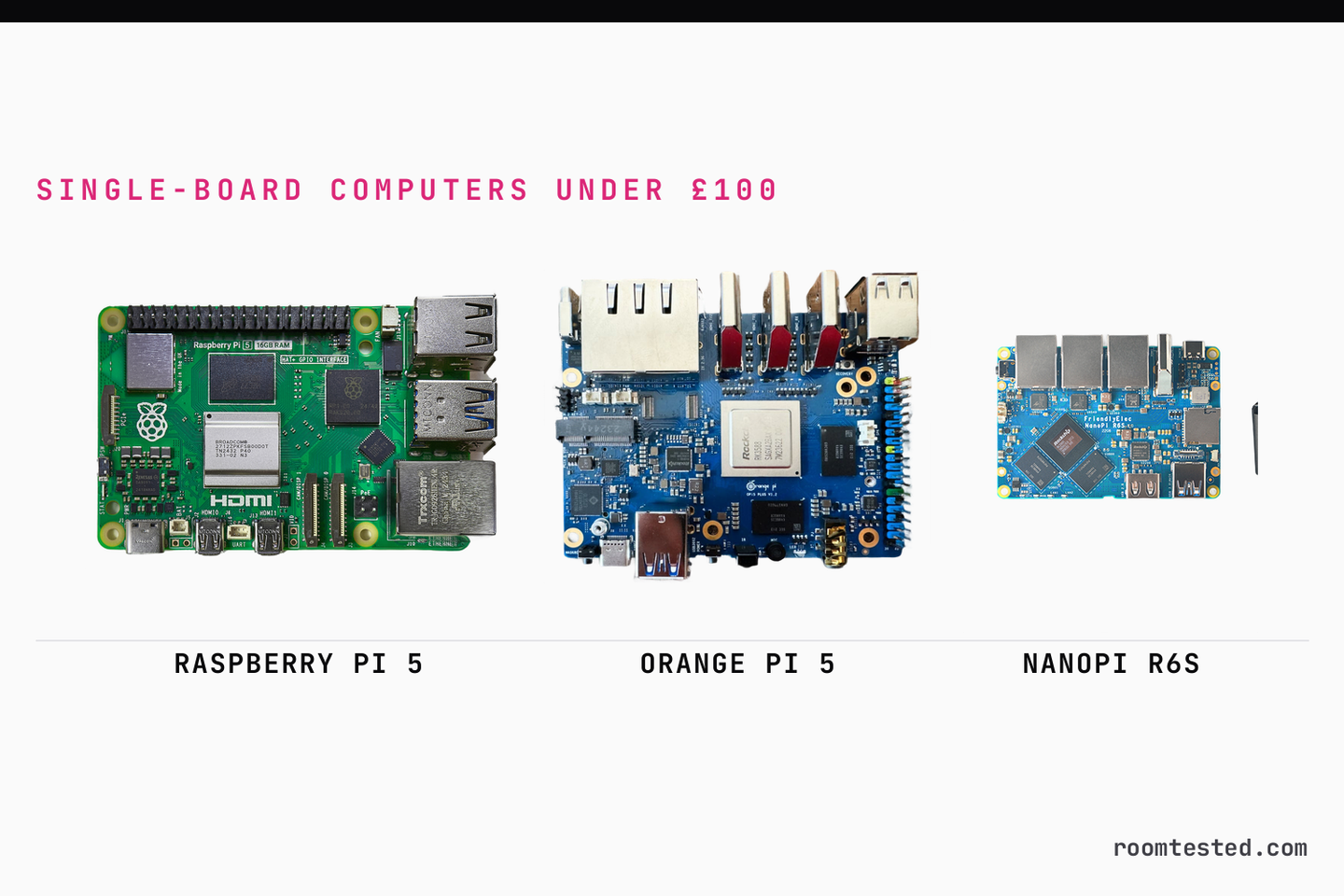
Three boards, three different jobs, and all of them affordable if you pick the sensible memory tier. For most people the answer is still a Raspberry Pi 5: it has the slowest chip here, and it wins anyway, because the software and the support mean a project gets built instead of debugged. If you want more, an RK3588 board like the Orange Pi 5 has the muscle for a desktop, a 4K media server or light AI, at the cost of rougher software. And if you are building a firewall or a router, a NanoPi R6S gives you the two fast Ethernet ports the others lack. This is a synthesis of the boards’ spec sheets, independent benchmarks (Phoronix and Jeff Geerling’s reproducible test data) and a long run of owner reports from r/OrangePI and r/openwrt, not our own bench test.
One thing to set up front, because it changes the maths this year. The 2026 memory shortage has pushed RAM-heavy boards up in price, the Raspberry Pi most visibly: the top-memory Pi 5 tiers that used to be a budget buy now cost noticeably more. So how much value you get depends on the memory tier and the week you buy. The live PriceWidget on each pick shows the current standard returning-buyer price; treat the relative ordering below as the durable part.
Raspberry Pi 5 (8GB)
Orange Pi 5 (8GB)
NanoPi R6S (8GB)
We may earn from qualifying purchases. Prices are standard (not new-user promo) estimates — check store for current price.
The three picks at a glance
| Pick | Chip | Ports / storage | Relative cost* | Best for |
|---|---|---|---|---|
| Raspberry Pi 5 | BCM2712, 4-core | 1× GbE, microSD, PCIe via HAT | the cheapest of the three | the all-rounder: home server, desktop, learning |
| Orange Pi 5 / RK3588 | RK3588(S), 8-core | GbE or 2.5GbE, on-board NVMe | a bit more than the Pi | the powerhouse: 4K media, NAS, light AI |
| NanoPi R6S | RK3588S, 8-core | 2× 2.5GbE + 1× GbE | the dearest of the three | the firewall / router box |
*Relative ordering at matched memory tiers. The live PriceWidget on each pick shows the current standard price; RAM-heavy tiers move week to week.
How to read this: faster silicon against better software
The single fact that decides most of this choice is a trade, and it is worth stating plainly. The RK3588 boards (the Orange Pi 5, the Radxa Rock 5 and their siblings) have clearly faster hardware than the Raspberry Pi 5. The Pi 5 still wins for most buyers, because its software and ecosystem outweigh the spec gap. That is the consensus across the independent reviews, not a fence-sit.
The numbers back the first half. The RK3588’s eight cores (four Cortex-A76 plus four A55) run multi-threaded work roughly 30 to 50 percent faster than the Pi 5’s four cores, with single-core performance about the same [4] [7] . On graphics the gap is wider: community benchmarks put the RK3588’s Mali GPU at many times the speed of the Pi 5’s GPU [5] . On paper, it is not close.
The second half is why the Pi still gets bought. Jeff Geerling, who reviews more of these boards than almost anyone, keeps coming back to the Pi because, in his words, the rival hardware is often there but the software support is not there [7] . He describes spending about half an hour on a well-reviewed RK3588 board just finding an image that would flash and boot [6] . Raspberry Pi OS is first-party, current, and documented; the RK3588 boards run vendor Debian or Armbian builds where hardware video and the AI accelerator do not always work on a standard kernel. It got worse before it got better: Rockchip stopped contributing RK3588 code upstream in late 2024, no longer treating it as an open-source chip [12] , and mainline kernel support for the chip’s HEVC and H.264 decoders only reached Linux in February 2026 [8] . A board you buy today on an older vendor image can still play video on the CPU instead of the hardware block.
Keep that trade in mind for every pick below. You are choosing where you want to spend your time: on the project, or on the board.
1. Raspberry Pi 5: the all-rounder
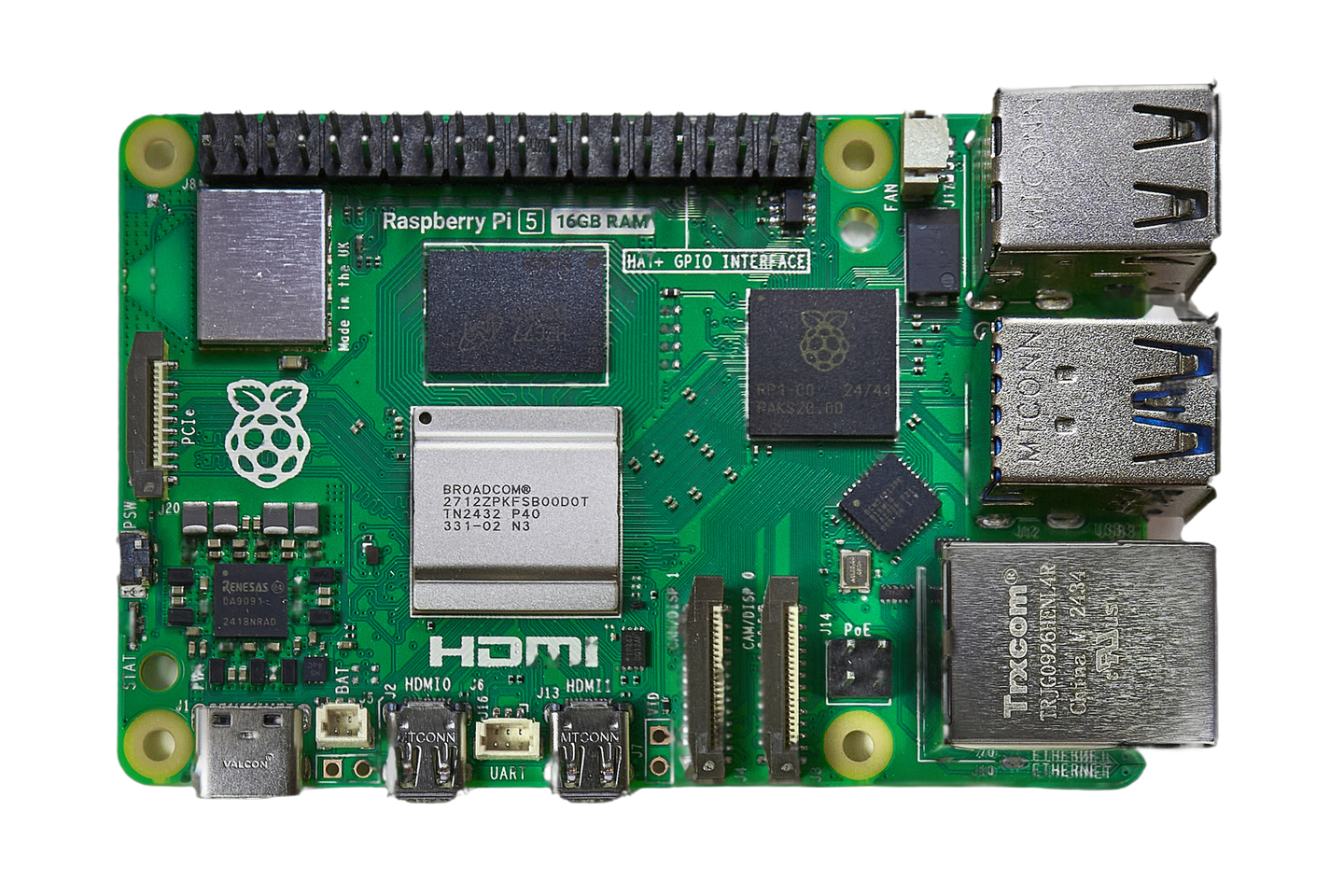
Buy the Pi 5 unless you have a specific reason not to. It is the slowest board here on raw compute, and for a home server, a desktop or a first Linux machine that barely matters, because everything you read online assumes a Pi and everything you plug in has a driver. The chip is a quad-core Cortex-A76 at 2.4GHz with dual 4Kp60 HDMI output, gigabit Ethernet, Wi-Fi and Bluetooth, two USB 3.0 ports and a single PCIe lane for storage [1] . It is the value pick of this group: the 2GB and 4GB tiers are the cheapest boards here, and the 8GB stays affordable, while the 16GB has been pushed up by the memory shortage, so skip it unless you genuinely need the RAM.
What to build with it. This is the board for a Pi-hole, a Home Assistant box, a small Docker host or a tidy low-power Linux desktop for web and writing. It runs retro consoles comfortably up to the PlayStation 1, Nintendo 64 and Dreamcast era; the weak GPU is the wall, so PlayStation 2 and GameCube are a stretch. It makes a fine media player for HEVC files, since the chip decodes HEVC in hardware, but note the codec gap: H.264 is decoded on the CPU and there is no hardware HEVC encode, so it is a poor choice as a transcoding server [2] . Add a PCIe M.2 HAT and it becomes a quiet single-drive NVMe NAS. And it is the obvious board for any project with GPIO pins, robotics or classroom teaching, because the tutorials all exist.
Where to buy it. This is the Pi’s other advantage: real UK stock and a real warranty, from The Pi Hut, Pimoroni, Okdo or Amazon UK, usually next-day. The others on this list come from China.
The catch, and the true cost. The bare board is not the whole bill. The Pi 5 wants the official 27W USB-C power supply or it under-volts and caps the current to its USB ports [1] , and it needs the official Active Cooler because it overheats under sustained load. Each is cheap on its own, but with a microSD card they are a meaningful slice of essential extras before you have stored anything; an NVMe HAT plus an SSD adds more. The single PCIe lane and the lack of an on-board M.2 slot are the real hardware limits against the RK3588 boards below.
2. Orange Pi 5 and the RK3588 boards: the powerhouse
When the Pi 5 is not enough, an RK3588 board is the upgrade, and the Orange Pi 5 is the best-known one. The chip is an eight-core design (four A76 plus four A55) with a much stronger Mali-G610 GPU, a 6 TOPS NPU for on-device AI, video decode up to 8K including AV1, and an on-board M.2 slot wired for a proper four-lane NVMe drive [3] [10] . That last point matters: where the Pi needs a HAT for one half-speed PCIe lane, these boards take a fast SSD directly. An Orange Pi 5 or 5 Pro in 4GB or 8GB costs a bit more than a Pi at the same tier; the 16GB versions and the bigger Radxa Rock 5 models are dearer again, so the budget RK3588 buy is a lower-memory board.
What to build with it. This is the board for a 4K media server. The video engine decodes HEVC and AV1 in hardware to 8K, so a Jellyfin or Plex box plays high-bitrate 4K without melting, which is exactly where the Pi 5 struggles. It makes a genuine NVMe NAS or home-server with real disk bandwidth, a usable ARM desktop for browsing and office work where the Pi 5 feels sluggish, and a platform for light local AI: the NPU runs small language models faster than the Pi managing it on CPU alone, with the heavy caveat that the toolchain to use it is immature and community-driven. The strong GPU also pushes emulation further than the Pi, often under Android, into the heavier consoles.
Where to buy it, and which one. Orange Pi and Radxa boards come from their official AliExpress stores (the Orange Pi from the Xunlong store), with three to six week delivery and a Chinese warranty. Two buying notes worth more than the spec sheet. First, within the RK3588 family, owners rate Radxa’s software support clearly above Orange Pi’s; if you want the least software pain, a Radxa Rock 5 is the better-supported sibling of the same chip [9] . Second, buy only from the official store, because third-party sellers have listed these boards at absurd mark-ups.
The catch. Everything in the “how to read this” section lands here. You are buying the faster board and the rougher software: vendor OS images that lag, hardware acceleration and NPU support that may not work until you find the right kernel, and a smaller community to ask. There is also an honest cross-shop. For a media server or a general home server specifically, an Intel N100 mini PC at a similar outlay runs x86, where every Docker image and codec just works, and it sidesteps the entire ARM software problem. If the project is “a server that does not fight me”, price one up before you commit to RK3588.
3. NanoPi R6S: the firewall and router box
The Pi 5 and the Orange Pi 5 each have one Ethernet port, which rules them out of the job a lot of people actually want an SBC for: a small, silent firewall or router. The NanoPi R6S is built for it. It pairs the RK3588S chip with two 2.5GbE ports plus a gigabit port in a fanless metal case, and owners report it routing a full 2.5-gigabit line at only a few watts, cool enough to leave in a cupboard. It is the dearest of the three picks; if you want to spend less, the older NanoPi R5S does the same two-2.5GbE trick on a weaker chip for considerably less, and the tiny Orange Pi R1 Plus LTS is the cheapest dual-gigabit option.
What to build with it. A 2.5GbE OpenWRT firewall or router, a VPN and ad-blocking gateway for the house, or the network front-end for a NAS. The multiple fast NICs are the entire point: this is the “two Ethernet ports means a firewall” board.
Where to buy it. From FriendlyElec directly or their official AliExpress store.
The catch, and it is a real one. The software story is rougher than the spec implies. These boards are not in the mainline OpenWRT tree; they run FriendlyElec’s own FriendlyWRT build on an older kernel, and owners report having to hand-tune it, one finding a “2.5GbE” router stuck at 600Mbps until he patched it himself [11] . If you were hoping to run OPNsense or pfSense, be warned that FreeBSD on ARM hardware is unreliable and not the supported path. The cheaper R5S uses the weaker RK3568 chip, which is fine for routing but little else. And the passive metal case that keeps it silent also limits sustained throughput under heavy load. For a firewall that simply works, an x86 N100 box is the safer base; the NanoPi is the pick when you specifically want tiny, silent and low-power.
What to build with each, at a glance
The right board is whichever fits the job, so here is the quick version:
- Pi-hole, Home Assistant, a small home server: Raspberry Pi 5 (any of them is overkill, so buy cheap)
- A light Linux desktop for web and office: Orange Pi 5 for a smooth feel, Pi 5 if you want the easy software
- A 4K Jellyfin or Plex media server: Orange Pi 5 or Radxa Rock 5 for hardware HEVC and AV1 decode
- An NVMe NAS or Docker host with real storage: Orange Pi 5 (on-board four-lane M.2), or a Pi 5 with a HAT for something smaller
- A firewall or router with fast Ethernet: NanoPi R6S (two 2.5GbE), or an N100 box if you want OPNsense
- Retro gaming: Pi 5 up to the PS1 and N64 era, an RK3588 board for heavier consoles
- Learning, GPIO and robotics: Raspberry Pi 5, for the tutorials and the community
- Light on-device AI or a local LLM to tinker with: an RK3588 board for the NPU, accepting the rough toolchain
Where to buy, and buying without getting burned
The buying reality splits cleanly. The Raspberry Pi 5 comes from those UK resellers with fast delivery and a warranty you can use. The Orange Pi, Radxa and NanoPi boards come from their official AliExpress stores, where you trade three to six weeks of shipping and a distant warranty for a lower price. Three rules cover all of them:
- Buy from the official store, not the cheapest third-party listing. Mark-ups and the odd counterfeit live on the resellers, especially on the higher-memory RK3588 boards.
- Price the whole build, not the board. A Pi 5 needs its PSU, cooler and a card; an RK3588 board wants the same class of 5V/5A supply and a drive. The headline number is not the landed cost.
- Match the memory tier to your budget. With RAM prices high in 2026, it is the 8GB and 16GB tiers that stretch the spend, not the boards themselves.
Verdict
Buy the Raspberry Pi 5 unless you have a specific reason not to: the 2GB or 4GB for a home server or a Pi-hole, the 8GB for a desktop, and budget a little more for the official power supply, cooler and a card. It is the value pick and the cheapest of the three. Step up to an Orange Pi 5 or a Radxa Rock 5 when you want a 4K media server, an NVMe NAS or a desktop that does not feel slow, and you can live with vendor software and a slower path to a working image; prefer Radxa for support, and weigh an Intel N100 mini PC if the job is really “a server that just works”. Choose a NanoPi R6S, the dearest of the three, when the build is a firewall or router that needs two fast Ethernet ports, accepting FriendlyWRT over mainline OpenWRT. Skip the 16GB Raspberry Pi at this year’s prices, skip OPNsense on any of these ARM boards, and for my own projects I would start with a Pi 5 and only reach for an RK3588 board when one actually outgrew it.
- Raspberry Pi: Raspberry Pi 5 product page and specification
- Raspberry Pi documentation: BCM2712 processor, HEVC hardware decode and H.264 encode detail
- Wikipedia: Rockchip RK3588 specification (cores, GPU, 6 TOPS NPU, 8K decode)
- Phoronix: Raspberry Pi 5 benchmarks against the octa-core Orange Pi 5
- Raspberry Pi forums: community GPU benchmark thread, Pi 5 against RK3588
- Jeff Geerling: why he still reaches for a Raspberry Pi despite faster rivals (software support)
- Jeff Geerling: CM5 benchmarks, and why faster RK3588 clones still lack software support
- CNX Software: RK3588 H.264 and H.265 decoders reach mainline Linux, February 2026
- r/OrangePI: owners on Orange Pi vendor support and recommending Radxa
- Radxa documentation: Rock 5B RK3588 specification (2.5GbE, on-board NVMe, NPU)
- r/openwrt: NanoPi 2.5GbE router capped at 600Mbps until hand-tuned on FriendlyWRT
- CNX Software: Rockchip stopped upstreaming RK3588 code and no longer treats it as an open-source chip, late 2024
Frequently asked
What is the best single-board computer for most people?
For most people, the Raspberry Pi 5, and it is the value pick of this group: the cheapest board here at the smaller memory tiers. It is the slower chip of this group, but its software, documentation and UK stock are far ahead, so projects actually get finished. Buy an RK3588 board like the Orange Pi 5 instead if you want a real desktop, a 4K media server or light on-device AI and you will tolerate rougher software. Buy a NanoPi R6S if you are building a firewall or router that needs two fast Ethernet ports. The live PriceWidget on each pick shows the current standard price.
Is the Raspberry Pi 5 or the Orange Pi 5 better?
The Orange Pi 5 has the faster hardware: eight cores against the Pi's four, a much stronger GPU, an on-board NVMe slot and a 6 TOPS AI accelerator. The Raspberry Pi 5 has the better software, the deeper documentation and the bigger community, which is why an SBC specialist like Jeff Geerling still reaches for it. Pick the Orange Pi for raw performance and storage, the Pi for a smooth, well-supported software path.
Can a single-board computer run a firewall or router?
Yes, if it has the right ports. A board with two or more 2.5GbE Ethernet ports, such as the NanoPi R6S, makes a tiny low-power OpenWRT firewall or router. The catch is software: these boards are not in the mainline OpenWRT tree and run FriendlyElec's own FriendlyWRT build, and FreeBSD-based OPNsense or pfSense on ARM hardware is unreliable. For a no-fuss firewall, an x86 Intel N100 mini PC is the easier base.
Which single-board computer is best for a 4K media server?
An RK3588 board such as the Orange Pi 5 or Radxa Rock 5. Its video engine decodes HEVC and AV1 in hardware up to 8K, so it plays 4K files without pegging the CPU. The Raspberry Pi 5 decodes HEVC in hardware but handles H.264 on the CPU and cannot encode HEVC, so it is fine as a player but weak as a transcoding server. For a server where every app just works, an Intel N100 mini PC is worth pricing up too.
What do you need to buy alongside a Raspberry Pi 5?
Budget for a handful of essential extras on top of the board. The Pi 5 needs the official 27W USB-C power supply to run at full power, or it under-volts and limits its USB ports, plus the official Active Cooler because it throttles under load, and a microSD card. Add an NVMe HAT and an SSD if you want fast storage rather than a card. The power supply and cooler are inexpensive, but together with a card they add a meaningful slice to the bare-board price, and an NVMe HAT and SSD add more again.
Get the honest stuff in your inbox
New reviews and price-checked UK deals on gear I’ve actually tested. About one email a week. No spam, unsubscribe anytime.
Related reviews & guides
 local ai · guide
The best GPU for running AI locally in 2026: VRAM, the used 3090, and the CUDA question
19 Jun 2026- local ai · guide
What is local AI? A plain-English guide to running LLMs on your own hardware
19 Jun 2026  networking · guide
Signal vs WhatsApp: same encryption, different owners, and the owner is the product
3 Jul 2026