 RoomTested
 Energy-monitoring smart plugs: which to buy, and the 13A trap the listing hides
A UK buyer's guide to energy-monitoring smart plugs: Tapo P110 vs Shelly vs Sonoff vs cheap Tuya, the 13A socket trap, how accurate the readings really are, and which to buy.
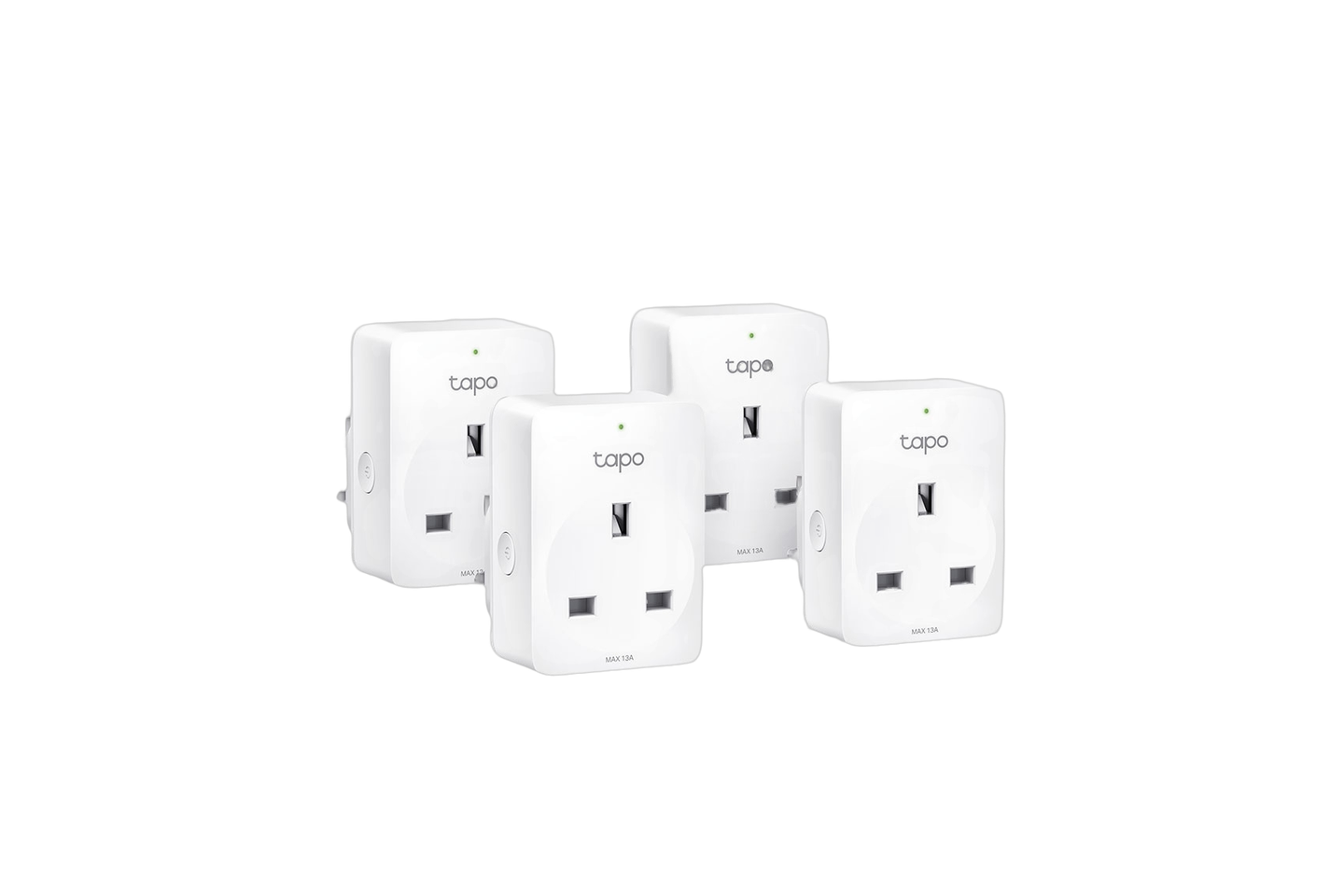
An energy-monitoring smart plug is the cheapest way to find out what an appliance actually costs to run, and for that one job it is genuinely worth the small outlay. Buy one. What the product pages skip is the honest part: the readings are good enough to catch a greedy fridge or a standby-power vampire, not good enough to argue with your supplier, and several plugs sold in the UK are quietly rated below the 13A a wall socket allows, so they cannot safely run a kettle. This guide pulls together the manufacturer spec sheets, a peer-reviewed accuracy study, the UK test press, and a large run of owner reports from Reddit and the Home Assistant and TP-Link forums. It is a synthesis of that evidence, not our own bench test.
The one-line version: for most people the TP-Link Tapo P110, the cheapest per plug in a multipack, is the right buy. Step up to a Shelly Plus Plug UK if you run Home Assistant and want local control, drop down to a Sonoff S60 if you want the cheapest route, and treat the generic cloud-only Tuya plug as a project, not a product.
What an energy-monitoring plug actually tells you
Every plug here does the same core thing: it sits between the socket and the appliance and reports live power draw in watts plus a running total in kilowatt-hours, which the app turns into a rough running cost. That is the feature you are paying the extra few pounds for over a dumb smart plug.
The catch is accuracy, and it is the single most important thing to be honest about. On a steady resistive load, a fan heater or a lamp, these plugs are close, within a percent or two. On a rapidly varying load they drift: a peer-reviewed study of five popular plugs, TP-Link and Sonoff among them, found significant errors in both power and energy measurement when monitoring highly variable loads [6] . Owner cross-checks tell the same mixed story. One owner who put two Tapo P110s against a reference plug found them diverging by roughly 500Wh over eight hours and concluded neither was accurate [5] ; another, running eight P110s, found them all accurate against a separate watt meter. The reconciliation is mundane: the app often shows averaged hourly power rather than the instantaneous figure, and there is real unit-to-unit and firmware variance. None of these consumer plugs carry an MID or revenue-grade certification, so none is a legal meter.
None of that stops it doing the one job it is good at, which is comparison: this old fridge pulls 90W average and the new one pulls 35W, the games console burns 15W doing nothing overnight, the towel rail is the real reason the bill jumped. For that, relative numbers you can trust are all you need, and these deliver them.
The UK gotcha the listing hides: 13A versus 10A
A UK BS1363 socket is fused at 13A, about 3000W at mains voltage. A surprising number of “smart plugs” sold here cannot take that. Many are an EU design in a UK adapter or a UK-pinned shell, and the body is only rated 10A (2300W) or 12A (2500W). That is under a 3kW kettle, a fan heater, or a tumble dryer on full, and running a load near or over a plug’s rating is exactly how the rare but real overheating incidents start.
So the rating is the first spec to check, not the app screenshots. The TP-Link Tapo P110 is rated to the full 13A [1] , and the Shelly Plus Plug UK is rated up to 3000W at 13A [2] . The ones to watch are the round-pin variants sold into the UK: Aqara’s own spec sheet rates its Smart Plug at 10A, 2300W, and Shelly’s Plus Plug S, the EU round-body version, tops out around 2500W rather than the UK plug’s 3000W. For a lamp, a TV, or a phone charger none of that matters. For anything that heats or has a motor, buy the 13A model and check the box.
Cloud or local: the choice that outlasts the plug
How a plug talks to the world decides how it behaves on a bad day and whether it still works in five years. There are three camps.
Cloud-first Wi-Fi is Tapo, Meross, and the Wi-Fi Sonoff. They are the easy, polished, cheap option, and they lean on the vendor cloud. That is fine until the cloud is not: Tapo had EU-wide outages in late 2024 and again in 2025 that took schedules and remote control down for hours, with the status page insisting nothing was wrong. Local control and Home Assistant integrations exist for both Tapo and Meross, but setup wants an account and the cloud is in the loop more than the enthusiast crowd likes.
Local-first is Shelly. The Plus Plug UK runs an on-device web server with a local HTTP and MQTT API, so Home Assistant talks to it directly with the cloud switched off entirely, and it draws under a watt in standby [2] . It is also an ESP32 inside, which is why it is the one plug here you can reflash with Tasmota or ESPHome if you want to cut the vendor out completely. You pay for that openness in money and in a less slick phone app.
Zigbee is Aqara and the Sonoff S60ZB. Zigbee is a low-power local mesh that runs through a hub rather than your Wi-Fi [4] , so the plugs work without internet and do not clog the 2.4GHz band, at the cost of needing a coordinator. Matter sits across the top: the Tapo P110M and Meross MSS315 add it, and Matter guarantees local on-off control by design [3] . The honest caveat is that energy data over Matter is still patchy in 2026. Apple Home will show a P110M and switch it but not display its energy figures, so you fall back to the vendor app for the very feature you bought the plug for.
The picks
TP-Link Tapo P110: the default for most people
If you want one plug and no homework, this is it. It is the UK’s best-selling energy plug, it is rated to the full 13A, the app is the most polished here, and in a four-pack it is the cheapest per plug of anything here. A single costs a little more than the per-plug price in a multipack. The P110M variant adds Matter for slightly more if you want HomeKit or cross-ecosystem switching, with the energy-over-Matter caveat above. Buy it from Amazon UK.
- Full 13A / ~3000W rating, safe for kettles and heaters
- The most polished app, and the cheapest per plug in a 4-pack
- Huge install base, so quirks and fixes are well documented
- P110M adds Matter for cross-ecosystem control
- Cloud-first: a vendor outage can take schedules offline
- Wi-Fi 2.4GHz only, and owners report the odd plug dropping offline
- An owner-reported reputation for units dying, so do not put a freezer on your only one
- Energy figures are app-averaged, so spot readings look off
Shelly Plus Plug UK: the Home Assistant pick
The one to buy if you run Home Assistant or simply refuse to depend on a cloud. It serves a local web interface and a local HTTP and MQTT API, works fully offline, reports its own sub-1W standby draw, and being an ESP32 it is flashable to Tasmota or ESPHome if you want to go further [2] . It is the premium choice here, dearer than the Tapo, and is sold through UK smart-home distributors rather than as an Amazon staple. The app is plainer than Tapo’s and owners note the metering reacts a touch slower. None of that matters if local control is the point.
- True local control: on-device web server, HTTP and MQTT, no cloud needed
- Full 13A / 3000W UK rating and a documented sub-1W standby draw
- ESP32 inside, so Tasmota or ESPHome reflashing is on the table
- Home Assistant native, the enthusiast favourite for reliability
- The dearest pick here and not sold widely on Amazon UK
- Plainer app and slightly slower metering than Tapo
- Runs warm by design, so keep loads comfortably under the rating
Sonoff S60: the cheapest sensible route
The value play, landed cheaply from AliExpress through the ITEAD official store. The Wi-Fi S60 uses an ESP32-C3 and works with both the eWeLink app and Home Assistant; the S60ZB Zigbee version is the one to get if you already run Zigbee2MQTT, because it drops onto your existing mesh for proper local control. Two honest notes: on the Zigbee model the running “total energy” figure has been reported as unreliable while the daily value is fine, and the cheaper S40 Lite has no energy monitoring at all, so check you are buying a metering model.
- Cheapest credible option, from the ITEAD official store
- Wi-Fi (ESP32-C3) or Zigbee S60ZB for local Home Assistant via Zigbee2MQTT
- Full-size S60 is a proper energy monitor, not a basic on-off plug
- AliExpress delivery times and the usual import faff
- Zigbee model's cumulative energy total reported as flaky; use the daily value
- The S40 Lite looks similar but does NOT monitor energy
The cheap generic Tuya plug: only if you will flash it
This is the bargain-bin plug behind a thousand AliExpress listings, often a 16A EU body squeezed into a UK shell. Stock, on the Tuya cloud, it is the reliability lottery the Home Assistant crowd warns about: owners report units dropping offline, showing the wrong state, and the occasional firmware update that bricks them, plus the Tuya region-lock that breaks control if your account is in the wrong place. There is a good version of this plug, but you have to make it: flash it with Tasmota or ESPHome, or buy the Zigbee variant and run it through Zigbee2MQTT, and the same cheap hardware becomes a local, dependable plug. As a plug you set up in the official app and forget, it is the one to avoid.
What owners actually complain about
Across the forums the gripes cluster into a familiar four, worth knowing before you buy.
- Plugs dropping offline. This is the loudest complaint and it hits every Wi-Fi brand, usually a fraction of a larger set rather than all of them. It is well enough documented that TP-Link’s own community forum carries owners with “really bad connectivity” on P110s while their Shelly and Nedis plugs stay up on the same network. The fixes owners land on are a fixed IP per plug and a separate 2.4GHz network for IoT gear, which points at the Wi-Fi setup as much as the plug.
- The 2.4GHz pairing dance. Every Wi-Fi plug needs a 2.4GHz network to set up and cannot see 5GHz. On the combined-band routers most UK ISPs ship, your phone sits on 5GHz and pairing silently fails until you split the bands or disable 5GHz briefly. It is the single most common setup wall, and it is not the plug’s fault.
- Bulk that blocks the next socket. Which? and other UK testers flag this repeatedly: some plugs are wide enough to cover the adjacent outlet on a double socket [7] . Tapo’s are among the slimmer ones; the in-wall Shelly route sidesteps it entirely. Check the dimensions against your socket.
- The rare thermal scare. There are isolated but repeated owner reports of a Shelly Plug S overheating near its rated load. Shelly’s own documentation is honest that the plugs run warm and cut off at 95C, which is the real lesson: do not sit a plug at its maximum rating for hours, and buy the 13A model for heavy loads.
What to check before you buy (UK)
- The amp rating first. 13A (~3000W) for anything that heats or spins, and do not assume; many plugs are 10A or 12A.
- Wi-Fi or Zigbee. Wi-Fi plugs are standalone but need 2.4GHz and lean on a cloud. Zigbee plugs need a hub but run local and quiet.
- How local you need it. If a cloud outage taking your schedules down would annoy you, buy Shelly or go Zigbee, not cloud-only Tuya.
- The physical size. Measure against your socket if the next outlet matters.
- Buy the metering model. A “Lite” or basic version often drops the energy monitoring; confirm the listing says it measures power.
- Price honestly. Compare the landed price including delivery, and ignore any one-time new-buyer or flash-sale price, which is not what you will pay.
Verdict
Buy the TP-Link Tapo P110 if you want the straightforward answer: full 13A, the best app, and the cheapest per plug in a four-pack, accurate enough to find what is costing you money even if it is no laboratory meter. Buy the Shelly Plus Plug UK instead if you run Home Assistant and want genuine local control with no cloud in the loop, and accept the higher price and plainer app for it. Buy a Sonoff S60, or the Zigbee S60ZB, if you want the cheapest credible route and do not mind AliExpress. Consider the Meross MSS315 or Tapo P110M only if you specifically need Matter, knowing energy-over-Matter is still partial today. And buy the generic Tuya plug only if you intend to flash it or run it over Zigbee2MQTT, because on the stock cloud it is the one owners come back to complain about. Whichever you choose, remember what the plug is for: it does not save energy, it shows you where yours is going, and that is worth the small outlay on its own. For my own setup I would put Tapo P110s on the everyday loads and a Shelly where I wanted the data to stay in the house.
- TP-Link UK: Tapo P110 product page (energy monitoring, 13A Max rating)
- Shelly: Plus Plug UK product page (up to 3000W at 13A, local web server plus HTTP/MQTT API, sub-1W standby, ESP32)
- Wikipedia: Matter (standard), local control by design over Wi-Fi or Thread
- Wikipedia: Zigbee, low-power local mesh networking through a coordinator/hub
- TP-Link Smart Home Community: owner cross-meter test of two Tapo P110s, ~500Wh divergence, and app-averaged power reporting
- Peer-reviewed study of five consumer energy plugs: significant power and energy errors on highly variable loads
- Which?: how to buy the best smart plug (size and socket-blocking warning)
Frequently asked
Are cheap smart plug energy readings accurate?
Accurate enough to find a power-hungry appliance or standby drain, not accurate enough to challenge your energy bill. Across owner cross-checks and a peer-reviewed study, these plugs land within a percent or two on steady resistive loads but drift on rapidly varying ones, and none carry a billing-grade (MID) certification. Treat the relative numbers as reliable and the absolute kWh with a pinch of salt.
What is the most accurate energy-monitoring smart plug?
No independent lab test crowns one, and per-unit variance is real, so this is the wrong question to obsess over. For trustworthy local data the Shelly Plus Plug UK is the enthusiast pick because it reports over a local API with no cloud in the way. For most people the Tapo P110 is accurate enough and a good deal cheaper.
Do smart plugs work without the internet?
It depends on the plug. A Shelly keeps working fully on your local network with the cloud switched off, and Zigbee plugs run through their hub without internet. Tapo and Meross are cloud-first: local and Home Assistant control exist but the initial setup wants an account, and a vendor cloud outage can take schedules offline. Stock cloud-only Tuya is the most internet-dependent of the lot.
Can a smart plug run a kettle or a heater?
Only if it is rated for the full 13A a UK socket allows, which is about 3000W. Check the rating before you buy: plenty of plugs sold in the UK use an EU design rated only 10A (2300W) or 12A (2500W), which is below a 3kW kettle or fan heater. The Tapo P110 and the Shelly Plus Plug UK are rated 13A; the round-pin Aqara and Shelly Plug S variants are not.
Which energy-monitoring smart plug should I buy first?
For most UK buyers the TP-Link Tapo P110, cheapest per plug in a four-pack, is the sensible default: full 13A, a polished app, and the country's best-selling energy plug. Choose the Shelly Plus Plug UK instead if you run Home Assistant and want local control, or a Sonoff S60 if you want the cheapest route and do not mind tinkering.
Can a smart plug actually save me money?
Not by itself. The plug draws around a watt in standby, so on an always-on low-power device it can cost slightly more than it saves. What it saves you is information: it shows which appliances are expensive to run and what your standby load is, so you can switch off the ones that are not worth it. The saving is the decision you make, not the plug.
Get the honest stuff in your inbox
New reviews and price-checked UK deals on gear I’ve actually tested. About one email a week. No spam, unsubscribe anytime.
Related reviews & guides
 networking · guide
Signal vs WhatsApp: same encryption, different owners, and the owner is the product
3 Jul 2026 desk pc · guide
Is Brave the best privacy browser? Yes for most people, with the settings pass it deserves
2 Jul 2026 desk pc · guide
Jellyfin vs Plex in 2026: the price rises settled most of the argument
2 Jul 2026