 RoomTested
 Aquacomputer Quadro: the fan controller for a custom loop, and whether you actually need it
A UK guide to the Aquacomputer Quadro fan controller: what it does, the coolant-temp control that justifies it, the aquasuite licence reality, and whether you actually need one.
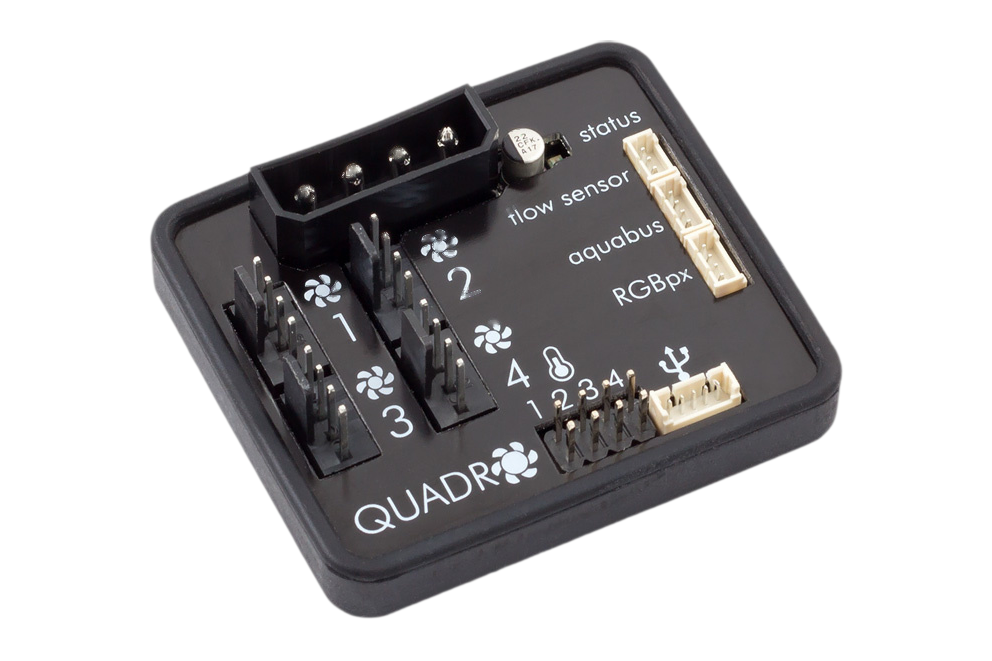
The Aquacomputer Quadro is a four-channel fan and pump controller for a custom water-cooling loop, and the honest reason to buy one is the software and the sensors, not the hardware. Its real trick is running your fan and pump curves off the coolant temperature, or the gap between the water and the room, rather than off a momentary CPU reading. A motherboard header cannot do that, and nor can Corsair’s Commander, so the fans track the loop instead of revving every time a core spikes for a second. That is the one strong case for owning one. If you run air cooling, an AIO, or a simple loop on a decent board, you do not need it, and this guide is as much about when to skip it as when to buy it. It is a synthesis of Aquacomputer’s own spec sheet, the r/watercooling and manufacturer-forum owner reports, and the established review sites, not our own bench test.
The one-line version: buy the Quadro if you have a custom loop and want coolant-temperature control in aquasuite; step up to the Octo if you need more than four monitored fans or a flow-failure shutdown; and reach for a cheap powered splitter or free software instead if you just need to spin a stack of fans.
What the Quadro actually is
Strip away the water-cooling mystique and it is a small board, about 54 by 49mm, that sits inside your case on SATA or Molex power and talks to the PC over an internal USB 2.0 header. It gives you four PWM fan channels, each independently controlled, rated at 25W per channel and 100W in total, which is enough to hang several fans off one channel through a splitter [1] . Alongside the fans it takes four temperature sensors (one is in the box), a flow-meter input, and it drives a single addressable RGB output of up to 90 LEDs [1] .
Two facts matter more than the rest. The first is that it is PWM only. It controls four-pin fans by their PWM signal and has no voltage regulation at all, so a three-pin or DC fan plugged into it runs flat out with no control [1] . Check your fans are four-pin before you buy. The second is that it is genuinely autonomous once configured: you set the curves in aquasuite, the Quadro stores them on the board, and it then runs them with the software shut or the PC asleep [1] . The only part that needs the software live is a curve fed by a value imported from the PC.
One limitation to understand up front, because it surprises people. Each channel reports the speed of one fan only. Aquacomputer’s own staff are clear that this is how all fan controllers work, so if you splitter four fans onto a channel you see one fan’s RPM and the other three spin unmonitored. It is not a fault, it is physics, but it shapes how you wire the thing.
The one reason to buy it: coolant-temperature control
Here is the feature that justifies the whole purchase. A normal motherboard ramps your fans against the CPU or a board sensor, which on a water loop is the wrong signal. The water has a large thermal mass, so it heats and cools slowly, and a one-second CPU spike does not change the coolant temperature at all. Tie your fans to the CPU and they surge and drop constantly for no thermal reason. Tie them to the coolant temperature, or better still to the difference between the coolant and the room, and they move smoothly with the actual heat the loop is shedding.
That coolant-temperature and delta control is the thing reviewers and owners keep returning to as the real point of an Aquacomputer controller, and the consensus is blunt: the advantage is the software, not the hardware [3] . Corsair’s Commander can switch and monitor fans, but it cannot build a water-versus-ambient curve, which is exactly why some owners move across from it [4] . If you have a custom loop and you have ever been annoyed by fans that whoosh up and down while the water sits at a steady temperature, this is the fix.
aquasuite, the learning curve, and the licence everyone argues about
The control all happens in aquasuite, Aquacomputer’s Windows software, and it is a real split personality. On one hand it is the most capable tuning environment in this corner of the hobby, with virtual sensors, scripting and curve editors that nothing else matches. On the other it is Windows only, there is no macOS or Linux setup, and it is not as friendly to a first-timer as Corsair’s iCUE. Expect to spend an evening learning it, and do not panic when every fan runs at 100% before you have configured anything, because that is the default until you set a curve.
Then there is the licence, which generates more heat in forum threads than any fan ever will. The facts, stated plainly, are calmer than the outrage. A Quadro comes with the current aquasuite and an update service for at least six months. After that you keep and reinstall the last version from your window forever, with no time limit, and a modest annual renewal is optional and only buys you newer releases [2] . It is update-gating, not a subscription, and your hardware never stops working when the service lapses. A much-shared 2026 post claiming an update had bricked a pump was edited by its own author to withdraw the claim, and the consensus is that aquasuite shows a warning you have to accept rather than silently disabling anything [2] . Dislike the model by all means, plenty do, but dislike the real version of it.
The gotchas owners actually hit
A handful of specific traps come up again and again, and most are about fans rather than the controller.
Fans run at 100% until Windows loads. During POST and the BIOS the Quadro has not yet been handed control, so it runs full speed until the driver loads. That is normal, and it is not the same as the autonomous-once-configured behaviour above. If silent boots matter to you, an Aquaero is the controller that runs standalone from the moment of power-on.
The Arctic P12 start-boost stall. The most-reported hardware quirk pairs the Quadro with fans that have no zero-RPM mode, the Arctic P12 PWM PST being the usual culprit. With start boost enabled they cyclically spin up and stall and report 0 RPM even while turning [5] . Aquacomputer support traced it to the fan batch rather than the software, and pointed owners to a workaround rather than a firmware fix [5] . The workarounds owners settle on are to disable start boost and set a minimum power so the fan never tries to stop, or to put a Noctua NA-FC1 inline.
It needs a spare internal USB 2.0 header. Without USB you cannot set or change a curve at all, and modern boards increasingly ship with only one of these headers. If yours is already taken you are buying an internal USB hub to go with it.
It throws a BIOS fan warning. Because the Quadro sends no RPM signal back to the CPU-fan header, many boards flag a fan error on boot until you disable that alarm in the BIOS. The Octo, not the Quadro, has a port that can feed a board a fake RPM signal to keep it quiet.
- Coolant-temperature and water-to-air delta curves a motherboard cannot do
- Four independent channels at 25W each, enough for many fans through splitters
- Four temperature inputs and a flow input for proper loop monitoring
- Runs its saved curves autonomously with the PC asleep or the software closed
- aquasuite is the most capable tuning software in the category
- PWM only, so three-pin and DC fans run at full speed
- aquasuite is Windows only and has a real learning curve
- The update-service licence gates newer versions after about six months
- Runs all fans at 100% until Windows loads, and needs a spare USB 2.0 header
- Only one aRGB channel, no display, and one RPM reading per channel
Quadro, Octo, Corsair, or a cheap hub
The Quadro does not exist in a vacuum, so here is where the money goes.
The Octo is the same idea with twice the room: 8 channels, two aRGB outputs, two flow inputs, and a signal output that can trigger a hardware shutdown if flow fails. It costs a bit more than the Quadro, and the recurring community advice is to just buy it. That is fair if you have more than four fans you want monitored separately or you want the flow-failure safety, but for a tidy four-channel loop the Quadro is the cheaper pick for the same software and the same per-channel behaviour.
Corsair’s Commander, the Pro or the newer DUO that replaces the discontinued Core XT, is the alternative if you already live in iCUE and want one box for RGB and fans. It does voltage control as well as PWM, which the Quadro does not, but it cannot build a coolant-versus-ambient curve, and iCUE is heavier and less liked than aquasuite. It is a fine choice for an air or AIO build, a weaker one for a sensor-driven loop.
A cheap powered PWM and aRGB hub, the budget kind that sells for next to nothing on AliExpress, plus your motherboard headers, is the honest budget answer. It has no sensors and no coolant logic, but if all you need is to drive a stack of fans from one header it does that, and the free FanControl and HWiNFO combination handles the curve logic in software. If your board has a coolant-temperature header, that cheap path gets you most of the way for a fraction of the price.
What to check before you buy (UK)
- Your fans are four-pin PWM. Three-pin or DC fans will run at 100% on a Quadro with no control.
- You have a spare internal USB 2.0 header, or budget for an internal hub, because without USB you cannot configure it.
- You actually want coolant-temperature control. That is the feature you are paying for. If you do not run a loop, you are buying sensors you will not use.
- Quadro or Octo. Four channels and one aRGB output, or eight channels, dual aRGB and a safety shutdown for the bit more the dearer Octo costs.
- You are on Windows. aquasuite does not run on macOS or Linux, though the curves persist on the device afterwards.
- Price honestly. The Quadro sells through specialist water-cooling retailers rather than the usual shops, so compare the landed price including delivery and confirm it at checkout.
Verdict
Buy the Aquacomputer Quadro if you run a custom water-cooling loop and want your fans and pump driven by coolant temperature or a water-to-air delta, with proper sensor inputs and the best tuning software in the hobby behind them. That single capability, which a motherboard and Corsair’s Commander cannot match, is what your money buys here. Step up to the dearer Octo if you want more than four individually monitored fans, dual aRGB, or a flow-failure shutdown. Skip all of it if you run air or an AIO, or a simple loop on a capable board, where a cheap powered splitter or the free FanControl and HWiNFO combination does the job and a coolant-temperature probe is the upgrade that actually matters. Go in knowing the catches: it is PWM only so your fans must be four-pin, aquasuite is Windows only with a learning curve and an update-gating licence, and it runs everything at full speed until Windows loads. None of those are dealbreakers for the loop builder it is built for. For my own loop I would fit the Quadro for a four-channel build and only reach for the Octo if I outgrew the channels.
- Aquacomputer: QUADRO product page (4 PWM channels at 25W each, PWM-only, 4 temperature inputs, 1 flow input, 90-LED aRGB output, USB 2.0, autonomous operation, aquasuite licence wording)
- r/watercooling: aquasuite update-service discussion (the licence gates updates after the included window; the “bricked hardware” claim was retracted by its poster)
- r/watercooling: is a Quadro/Octo really needed (community consensus that the advantage is the software and sensors, not the hardware)
- r/watercooling: Corsair Commander vs Aquacomputer Quadro (Corsair cannot do coolant-vs-ambient delta curves; the aquasuite paywall complaint)
- Aquacomputer forum: Arctic P12 PWM PST start-boost stall on the Quadro (no zero-RPM mode, not software-fixable, workarounds)
Frequently asked
Do I need a fan controller like the Quadro for water cooling?
Only if you want what it uniquely does: run your fans and pump off coolant temperature rather than CPU temperature, with the sensor inputs and software to back it. For an air cooler, an AIO, or a simple loop on a capable motherboard, you do not need one. A powered PWM splitter off a motherboard header, or the free FanControl and HWiNFO combo, controls plenty of fans, and a coolant-temperature probe is the cheaper upgrade that actually changes how the loop behaves.
What is the difference between the Aquacomputer Quadro and Octo?
The Octo is the bigger version: 8 fan channels instead of 4, two aRGB outputs instead of one, two flow inputs, and a signal output that can hard-shut-down the PC if flow drops to zero. Both share the same software, the same 25W per channel, and the same one-RPM-reading-per-channel behaviour. Pay the bit more the dearer Octo costs if you want more than four individually monitored fans or that safety shutdown; the Quadro is the right pick for a four-channel build.
Is aquasuite a subscription? Does the licence expire?
It is not a subscription, and it does not switch your hardware off. A Quadro includes the current aquasuite plus an update service for at least six months. After that you keep using the last version released in your window forever, with no time limit, and you only pay a modest annual renewal if you want newer versions. A widely shared claim that an update bricked someone's hardware was later retracted by the person who posted it.
Can the Quadro control 3-pin (DC) fans?
No. The Quadro is PWM only, so it controls 4-pin PWM fans by their PWM signal and has no voltage regulation. Plug a 3-pin or DC fan into it and the fan runs at full speed with no control. If you have 3-pin fans you need a controller that does voltage control, such as an Aquacomputer Aquaero, or you change the fans.
Does the Quadro work without the PC or software running?
Yes, once it is set up. You configure the curves in aquasuite, the Quadro stores them on the controller, and it then runs them on its own with the software closed or the PC asleep. The exception is any curve that depends on a value imported from the PC, such as a software sensor, which needs aquasuite running to feed it.
Why do my fans run at 100% on boot with the Quadro?
Because the Quadro defaults to full speed during POST and the BIOS, and only follows your curve once Windows loads the driver and hands control over. This is normal, not a fault. Once the system is up the saved curve takes over, and the controller keeps running it even if you later close the software.
Get the honest stuff in your inbox
New reviews and price-checked UK deals on gear I’ve actually tested. About one email a week. No spam, unsubscribe anytime.
Related reviews & guides
 desk pc · guide
Is Brave the best privacy browser? Yes for most people, with the settings pass it deserves
2 Jul 2026 desk pc · guide
Jellyfin vs Plex in 2026: the price rises settled most of the argument
2 Jul 2026 networking · guide
Signal vs WhatsApp: same encryption, different owners, and the owner is the product
3 Jul 2026